Tier III · The Terminal · Desktop app

The system you built, on the glass while you trade.

A live command center that runs on your machine against your own feed. It reads the tape through the methodology you wrote, keeps your risk plan next to the prop firm's limits, and speaks up the moment your position stops looking like your playbook. When the one-minute chart is doing its best to make you forget what you know, this is the desk that remembers.

The Terminal · live desk · MNQ
Product preview
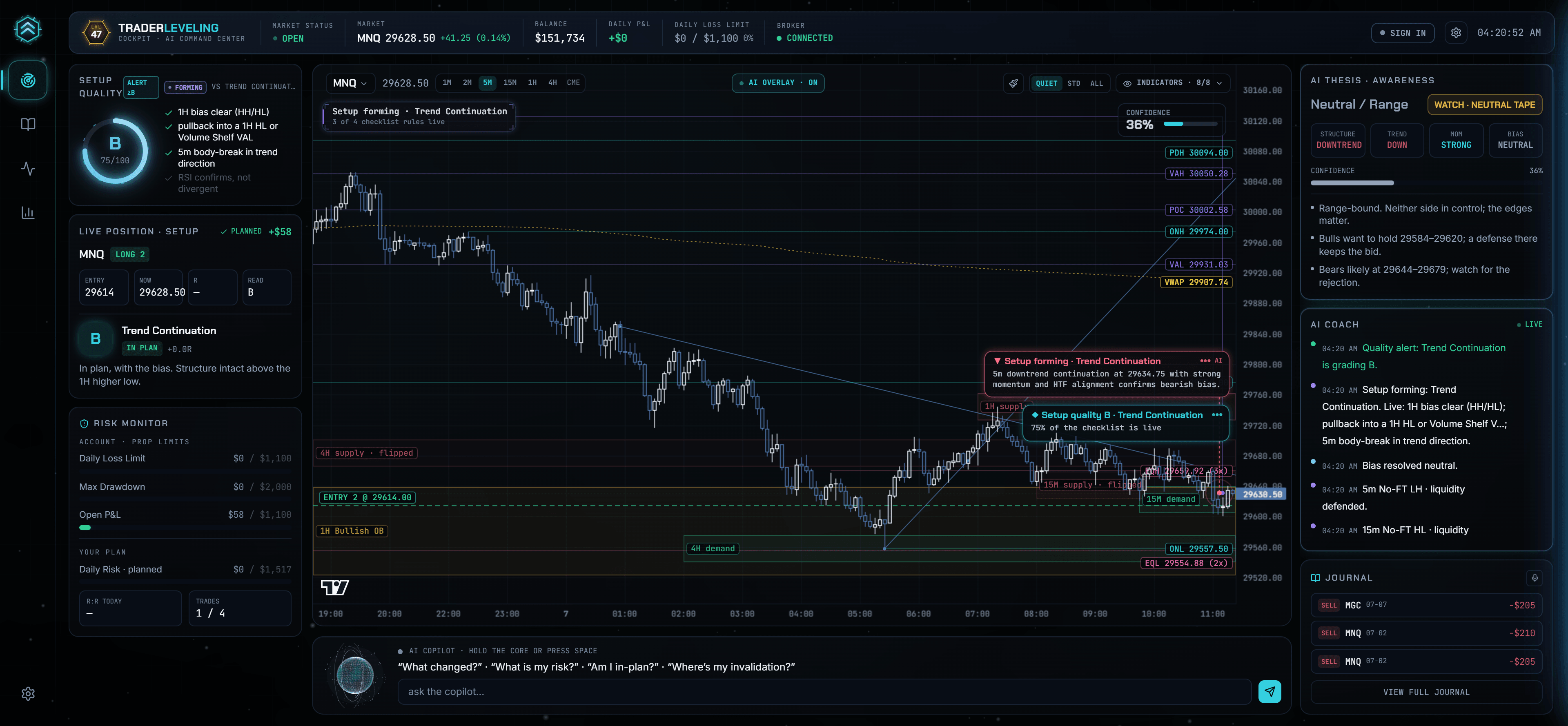
The Terminal desktop app monitoring a live MNQ long: entry line on the chart, setup quality graded B against the trader's playbook, a live AI insight flagging the forming setup, risk monitor and coach feed around a live chart

An actual capture · the Terminal reading a live MNQ session through a trader's own system

What's on the glass

Every panel answers a question you ask mid-trade.

AI Thesis
What is the market doing?

A live structure read across your timeframes: 4H, 1H and 5m nested into one bias, with the confidence stated plainly. Neutral chop says neutral chop; it never manufactures a lean.

Setup Quality
Is this actually my setup?

The forming tape is scored against your own playbook checklist, item by item, and graded live. Not a generic pattern detector: your rules, your setup names, your grade.

Risk Monitor
How much room do I really have?

The prop firm's limits and your own plan, side by side: daily loss limit, trailing drawdown, trades taken against your cap. It reddens on your rules before the firm's ever get close.

Position Awareness
Am I still in-plan?

Once you are in a trade it states the facts: in-plan or off-plan, live R, the level that invalidates you and the one that confirms. Facts to decide with, never an instruction.

Auto-charting
What am I not seeing?

Deterministic structure sensors draw what they find straight onto the chart: supply and demand zones, fair value gaps, pivot labels, liquidity sweeps. The AI overlay renders facts, on your timeframe.

Journal & Coach feed
What happens to all of it?

A pre-market plan, a live journal and a session review ride along, and every event the desk notices lands in the coach feed. Close a trade and it is already logged back to your account.

The discipline loop

It cannot stop you. It can make sure you saw it.

When a fill lands, the Terminal asks the only question that matters: which planned setup is this? Match it and the desk tracks the trade against that plan. No match, and you get a loud, honest prompt to acknowledge an unplanned trade before you do anything else.

  • Every fill maps to a planned setup, or gets flagged as unplanned on the spot.
  • Oversize, revenge, adding to a loser: still your right, but it is stamped and follows you to review.
  • Tomorrow's journal opens with the truth already written down.
Planned · in-plan

Long MNQ matches your continuation plan. The desk tracks R against the stop you planned, not the one you are tempted to move.

Unplanned · acknowledged

No planned setup matches this position. You acknowledged an unplanned trade at 07:42. The review will start here.

Ask the copilot

"Am I in-plan?" "Where is my invalidation?" Grounded answers from your own system and the live tape. Analysis only: you make the call.

Built different

Your machine. Your feed. Your system.

Runs on your machine
A downloadable desktop app, not a browser tab. Your edge and your live tape never leave your computer.
Your own feed
Connect the broker or market-data API you already trade on. Your entitlement, your live data, streamed locally.
Reads your system
The methodology you define in TraderLeveling drives its reads, grades and warnings. Two traders see two different Terminals.
Logs back to your account
Closed trades, plans and journal notes sync to your journal automatically. The process stays one loop.
01
Install from your account
Sign in and get the desk from your Terminal page. Install once, then a click from your account launches it.
02
Connect your feed
Sign in once, link your broker API, and the desk runs live and local on your machine.
03
Trade, it logs itself
Your fills, reads and grades flow back to your TraderLeveling account automatically.
Requires your own broker API or live data feed. Bring the one you already trade on.Windows · macOS coming soon

The Terminal reads your own live feed on your machine for awareness, not trade signals or advice. Every execution decision is yours. See the Terms.

The Terminal ships soon. Your system should not wait.

Everything the desk reads comes from the methodology you build in TraderLeveling today. Start now, and by the time the Terminal lands it already knows how you trade.